Course Objectives
1. What will I learn by taking the SAP Basis Admin course in Bangalore?
You'll build a solid understanding of the core concepts, terminology, and fundamentals of SAP Basis Admin, giving you a strong foundation to build on.
2. What hands-on skills will I gain from the SAP Basis Admin training?
You'll get hands-on experience with industry-relevant SAP Basis Admin tools and workflows through guided exercises, so you learn by doing rather than just reading theory.
3. How does the SAP Basis Admin course prepare me for real-world work?
The SAP Basis Admin course is designed around how SAP Basis Admin is actually applied to solve real-world problems in professional settings, not just textbook scenarios.
4. What practical, job-ready skills will I build during SAP Basis Admin training in Bangalore?
You'll develop the practical skills needed to confidently work with SAP Basis Admin on the job, so you're ready to contribute from day one in a SAP Basis Admin role.
5. Will I work on real projects during the SAP Basis Admin course?
Yes, the SAP Basis Admin course includes real-time projects and case studies that reinforce concepts through practice, giving you portfolio-ready work by the end.
6. How does the SAP Basis Admin course help with certification and job interviews?
The SAP Basis Admin course is structured to help you prepare for relevant certifications and interviews, covering the concepts and terminology employers and exam boards expect.
Popular Techniques Covered in This Course
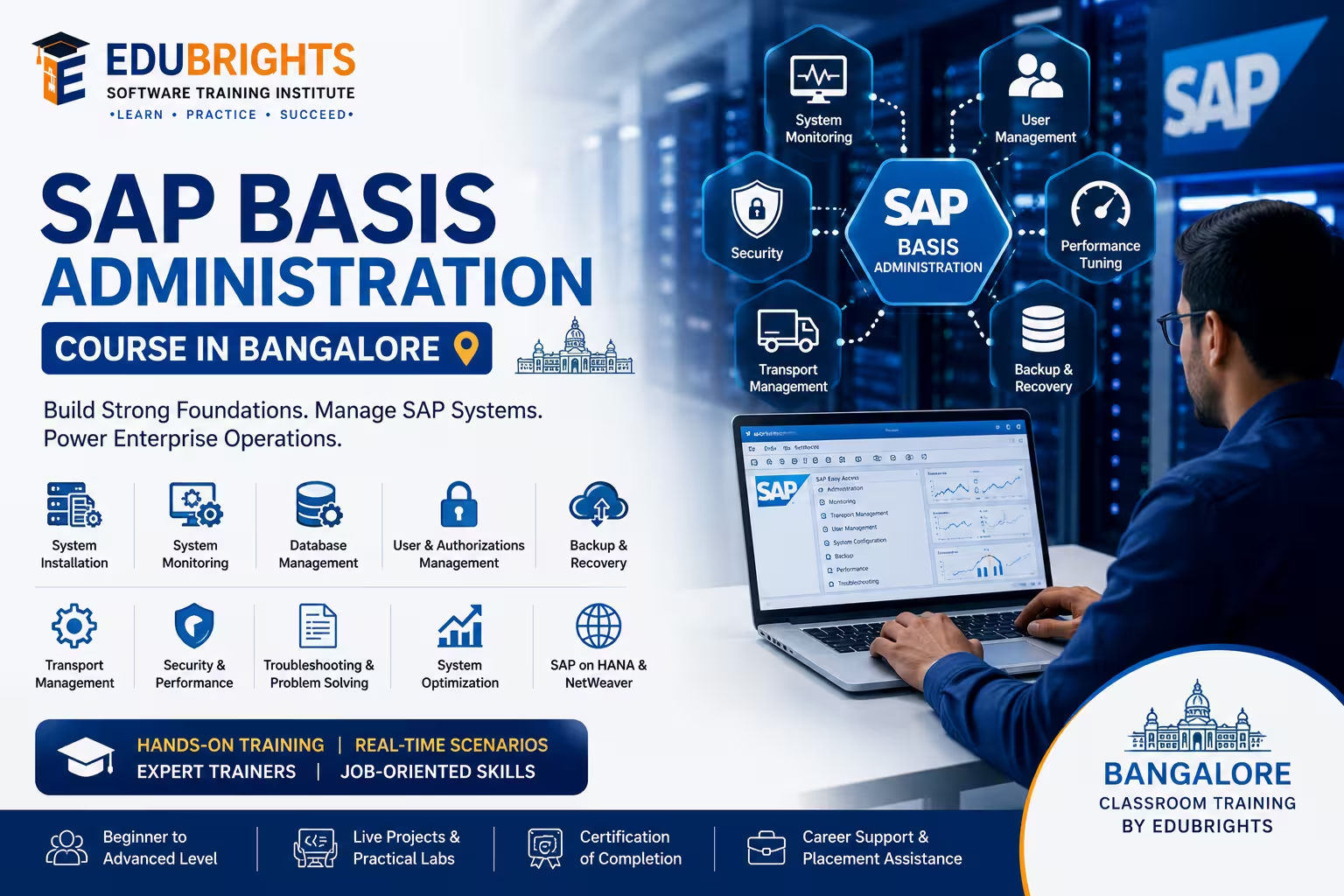
SAP BASIS Architecture
SAP Installation and Configuration
User and Authorization Management
SAP Transport Management System (TMS)
Client Administration
SAP System Monitoring
Performance Tuning and Optimization
Backup and Recovery Management
SAP Kernel and Patch Management
SAP Security and System Administration
Get Hands-on Knowledge about Real-Time Projects
Project 1
Project 1: SAP System Installation and Configuration
Install and configure an SAP environment, including application servers, database connectivity, and system parameters.
Project 2
Project 2: SAP Landscape and Transport Management
Configure a multi-system SAP landscape and manage transport requests between development, quality, and production systems.
Project 3
Project 3: SAP User and Security Administration
Implement user roles, authorization profiles, password policies, and security controls for enterprise SAP environments.
Project 4
Project 4: SAP Performance Monitoring and Optimization
Analyze system bottlenecks, monitor workloads, optimize memory usage, and improve SAP application performance.
Project 5
Project 5: SAP Backup and Disaster Recovery Planning
Design and implement backup, recovery, and disaster recovery procedures to ensure business continuity and system availability.
Key Features
Edubrights offers SAP BASIS ADMINISTRATION – SYSTEM MANAGEMENT in virtual mode with expert trainers. Here are the key features,
40 Hours Course Duration
100% Job Oriented Training
Industry Expert Faculties
Free Demo Class Available
Completed 500+ Batches
Certification Guidance
Curriculum
Module 1: Introduction to SAP Basis
- SAP Basis overview: the technical foundation of SAP systems
- SAP system landscape: development, quality, and production environments
- SAP architecture: application server, message server, and database layer
- SAP GUI: connecting to SAP systems and navigating transactions
Module 2: SAP System Installation and Landscape
- SAP installation overview: SWPM and pre-installation requirements
- SAP system landscape design: three-system and two-system landscapes
- SAP NetWeaver architecture: AS ABAP and AS Java components
- System profiles: instance profile, default profile, and start profile
Module 3: User and Authorization Management
- User master records: creating and maintaining user accounts
- Roles and profiles: single roles, composite roles, and profile generation
- SU01, PFCG, and SU10: key authorisation management transactions
- Authorisation concepts: authorisation objects, fields, and values
Module 4: SAP Transport Management
- Transport Management System (TMS): configuration and landscape setup
- Transport requests: creating, releasing, and importing transports
- Transport routes: configuring consolidation and delivery routes
- Transport monitoring: tracking transport status and import queues
Module 5: SAP Background Jobs and Scheduling
- Background processing: job classes, steps, and scheduling
- SM36 and SM37: defining and monitoring background jobs
- Periodic jobs: daily, weekly, and event-driven scheduling
- Job monitoring and error analysis in SM37
Module 6: SAP Performance Monitoring
- SAP Work Process overview: dialog, background, update, and spool
- SM50 and SM66: work process monitoring and management
- ST05 and ST12: SQL trace and ABAP trace for performance analysis
- Early Watch Alert: proactive performance monitoring with SAP Solution Manager
Module 7: SAP System Administration
- Spool management: output management and printer configuration
- Client administration: client copy, export, and import procedures
- System refresh: copying production data to non-production systems
- SAP kernel upgrade: steps and considerations for kernel patching
Module 8: Capstone Project and Assessment
- SAP landscape configuration: TMS setup and transport route definition
- User and authorisation management exercise
- Background job scheduling and performance monitoring simulation
- Final assessment and course certification
Receive Training From Our Skilled and Effective Trainers
Experience in the Industry Gain expertise from SAP Basis Admin professionals training in Bangalore who have applied their skills on live projects across corporate, product, and consulting environments, bringing practical, real-world context into every SAP Basis Admin session.
Backgrounds at the Top Our SAP Basis Admin trainers in Bangalore bring hands-on industry experience, having worked on real SAP Basis Admin projects for organizations across various industries before moving into training.
Clear & Effective Teaching Core SAP Basis Admin concepts, tools, and workflows are explained using real project examples and practical scenarios, so you understand not just the theory but how SAP Basis Admin is actually used on the job.
Hands-On Learning Focus Students get structured, hands-on practice with SAP Basis Admin through guided exercises, mini-projects, and lab work designed to build practical, job-ready skills.
Up-to-Date Knowledge Trainers keep the SAP Basis Admin curriculum current with the latest tools, versions, and industry best practices, so what you learn stays relevant to how SAP Basis Admin is used today in Bangalore and beyond.
Succeed Our Resourceful Certification
The Certified SAP BASIS Administration and System Management Professional certification validates expertise in SAP system administration, monitoring, security, transport management, performance optimization, and system maintenance. It demonstrates the ability to manage SAP landscapes, troubleshoot technical issues, and maintain enterprise SAP environments. This certification enhances career opportunities in SAP administration, infrastructure management, and technical consulting.
Course FAQs
1. What is SAP Basis Administration?
SAP Basis Administration is the technical administration layer responsible for managing SAP systems and their infrastructure. It covers installation, configuration, monitoring, user administration, transport management, performance optimization, security, backup, and troubleshooting.
2. What are the main responsibilities of an SAP Basis Administrator?
An SAP Basis Administrator manages the technical operation and availability of SAP environments. Key activities include system installation, configuration, user and authorization management, transport administration, monitoring, performance tuning, patching, backup, recovery, and technical troubleshooting.
3. What is SAP system architecture?
SAP system architecture defines how the presentation, application, and database layers interact. Basis administrators work with application servers, databases, work processes, communication services, and system configuration to maintain the SAP environment.
4. What is an SAP system landscape?
An SAP system landscape is a group of connected SAP systems used for different stages of application development and operation. A typical landscape can include Development, Quality Assurance/Test, and Production systems.
5. What is an SAP application server?
An SAP application server provides the runtime environment for SAP applications. It contains work processes and technical services that process user requests and communicate with the database and other SAP components.
6. What is the SAP Message Server?
The SAP Message Server enables communication between application-server instances within an SAP system. It also supports logon load balancing by helping distribute user connections among available application servers.
7. What is the SAP Dispatcher?
The SAP Dispatcher receives requests from users and distributes them to available work processes. It coordinates communication between the client, application server, and work-process layer.
8. What are SAP work processes?
SAP work processes execute different categories of SAP application tasks. Common work-process types include Dialog, Background, Update, Spool, and Enqueue, each serving a specific technical function.
9. What is a Dialog Work Process?
A Dialog Work Process handles interactive requests generated by SAP users. It executes the required application logic and returns the resulting information to the user's session.
10. What is a Background Work Process?
A Background Work Process executes scheduled jobs without requiring continuous user interaction. It is commonly used for periodic, batch, or resource-intensive processing.
11. What is an Update Work Process?
An Update Work Process handles database update requests generated during SAP transaction processing. It helps separate update operations from interactive dialog processing.
12. What is a Spool Work Process?
A Spool Work Process manages SAP output requests generated by applications. It supports activities related to printing and other output-processing operations.
13. What is an Enqueue Work Process?
An Enqueue Work Process manages SAP's logical locking mechanism. Locks help prevent conflicting transactions from modifying the same business data at the same time.
14. What is SAP system installation?
SAP system installation involves preparing the required operating system and database environment, installing SAP software components, and completing the initial system configuration. The installation procedure depends on the SAP product and supported system version.
15. What is SWPM in SAP Basis?
SWPM stands for Software Provisioning Manager. It is an SAP tool used for supported software provisioning activities such as installations, system copies, and related lifecycle operations.
16. What are SAP system profiles?
SAP system profiles contain configuration parameters that control the behavior of SAP instances and systems. Important profile types include the Default Profile, Instance Profile, and Start Profile.
17. What is an Instance Profile?
An Instance Profile contains parameters specific to an SAP application-server instance. These parameters control technical settings related to the operation of that particular instance.
18. What is a Default Profile?
The Default Profile contains system-wide parameters that can apply to multiple SAP instances. It provides common configuration settings for the SAP system.
19. What is SAP GUI?
SAP GUI is a client interface used to connect to SAP systems and execute transactions. Basis administrators use SAP GUI to access administration, monitoring, user-management, and configuration functions.
20. What is client administration in SAP?
An SAP client is a logically independent organizational unit within an SAP system. Client administration includes activities such as client creation, protection, copying, export, import, and post-copy processing.
21. What is an SAP client copy?
An SAP client copy transfers selected client-dependent data from one client to another. It can be used to create or refresh non-production client environments according to the applicable SAP procedure.
22. What is system refresh in SAP Basis?
System refresh involves updating a non-production SAP system or client with data from another SAP system, commonly production. The process requires careful planning of data, configurations, users, interfaces, and post-refresh activities.
23. What is SAP user administration?
SAP user administration involves creating, modifying, locking, unlocking, and maintaining user accounts. User administration also includes assigning appropriate roles and authorizations to users. SAP documentation describes user master records as client-specific.
24. What is transaction SU01?
SU01 is used to maintain individual SAP user master records. Administrators can use it to create users, modify user information, lock or unlock accounts, and maintain user-related assignments.
25. What is transaction SU10?
SU10 provides mass user-maintenance functionality. It is useful when administrators need to perform similar user-management activities for multiple users.
26. What is PFCG in SAP Basis?
PFCG is the transaction used for role administration in SAP. It supports role creation, menu assignment, authorization maintenance, profile generation, and role-related user assignments.
27. What are authorization objects in SAP?
Authorization objects define the fields used during SAP authorization checks. Authorization values assigned through roles determine which activities and data users are allowed to access.
28. What is the difference between single roles and composite roles?
A single role contains authorization and menu information for a particular access requirement. A composite role groups multiple single roles so that several related access permissions can be assigned together.
29. Can SAP roles be transported between systems?
Yes. SAP roles can be transported between systems using supported role-transport functions. SAP documentation describes transporting roles through PFCG, including authorization data and relevant role information.
30. What is SAP Transport Management System (TMS)?
SAP Transport Management System (TMS) manages the movement of transport requests between SAP systems. It supports transport-domain configuration, transport routes, import queues, transport monitoring, and controlled movement of changes.
31. What is a transport request?
A transport request is a container that records changes that need to be moved between SAP systems. It can contain development objects, configuration changes, and other transportable objects.
32. What is a transport route?
A transport route defines the path through which transport requests move between SAP systems. It helps control how changes are transferred between development, quality, and production environments.
33. What is STMS?
STMS is the main SAP transaction used for Transport Management System administration. Basis administrators can use it to configure transport domains, define routes, monitor import queues, and manage transport activities.
34. What is a transport domain?
A transport domain is a group of SAP systems managed through a common TMS configuration. It provides the technical framework required for communication and transport administration across the SAP landscape.
35. What is transport monitoring?
Transport monitoring involves checking transport requests, import queues, return codes, logs, and import history. It helps administrators identify failed imports, missing dependencies, or other transport-related problems.
36. What is SAP background job management?
SAP background job management involves defining, scheduling, releasing, monitoring, and troubleshooting jobs that execute without direct user interaction. The Edubrights curriculum specifically covers job classes, job steps, periodic jobs, SM36, and SM37.
37. What is SM36?
SM36 is used to define and schedule SAP background jobs. Administrators can configure job steps, start conditions, periodic scheduling, and other execution parameters.
38. What is SM37?
SM37 is used to monitor background jobs. It provides information about job status, execution time, job logs, cancelled jobs, and spool output.
39. What are common SAP background job statuses?
Common background-job statuses include Scheduled, Released, Ready, Active, Finished, and Cancelled. These statuses indicate whether a job is waiting for execution, currently running, successfully completed, or terminated.
40. What is SAP system monitoring?
SAP system monitoring involves checking work processes, application servers, system logs, background jobs, locks, updates, database activity, and system resources. It helps administrators identify technical issues and maintain system availability.
41. What are SM50 and SM66?
SM50 displays work processes for an individual SAP application-server instance, while SM66 provides a system-wide view of work processes across application servers. They are useful for investigating long-running processes, resource utilization, and performance problems.
42. What are ST05 and ST12 used for?
ST05 provides SQL and related trace capabilities for analyzing database access and performance behavior. ST12 combines tracing capabilities useful for analyzing ABAP execution and database-related performance issues.
43. What is SAP performance monitoring?
SAP performance monitoring evaluates response times, workload, work-process utilization, memory consumption, database activity, and other system indicators. The Edubrights curriculum includes work-process monitoring, SQL tracing, ABAP tracing, and proactive performance monitoring.
44. What is SAP performance tuning and optimization?
SAP performance tuning involves identifying technical bottlenecks and improving the use of system resources. Depending on the problem, administrators may analyze work processes, SQL statements, ABAP execution, memory, database performance, and system configuration.
45. What is EarlyWatch Alert?
EarlyWatch Alert is an SAP monitoring capability designed to provide proactive analysis of system health and performance. It can help identify technical risks, performance trends, and areas that may require administrative attention.
46. What is SAP spool management?
SAP spool management handles output requests created by SAP applications. Basis administrators can monitor spool requests, configure printers and output devices, troubleshoot printing issues, and manage spool-related data.
47. What is SAP kernel upgrade and patch management?
SAP kernel management involves maintaining the executable technical components of an SAP system. Kernel maintenance can include checking compatibility, applying supported patches or upgrades, testing the changes, and carefully deploying them across the landscape.
48. What is SAP backup and disaster recovery management?
Backup and disaster recovery management protects SAP data and supports restoration after system failures or data-loss events. It includes backup planning, monitoring, recovery procedures, disaster-recovery strategies, and recovery testing.
49. What practical projects can be covered in SAP Basis Administration training in Bangalore?
The Edubrights course includes projects such as SAP System Installation and Configuration, SAP Landscape and Transport Management, SAP User and Security Administration, SAP Performance Monitoring and Optimization, and SAP Backup and Disaster Recovery Planning. The curriculum also includes a capstone covering TMS setup, user authorization management, background-job scheduling, and performance monitoring.
50. What technical skills can I gain from SAP Basis Administration training in Bangalore?
SAP Basis Administration training can help develop skills in SAP architecture, installation and configuration, SWPM, system profiles, client administration, SU01, SU10, PFCG, authorization management, TMS, STMS, transport routes, background jobs, SM36, SM37, SM50, SM66, ST05, ST12, performance monitoring, spool administration, kernel management, backup and recovery, security administration, and SAP system troubleshooting. These topics align with the technical curriculum published for the Edubrights SAP Basis Admin course in Bangalore.
Get Training Quote for Free
Testimonials
Hear What our Students say
"Transform your life through Education, hear it from our Alumni"

6 LPA
Fathima
Student
Software Engineer
"Transform your life through Education, hear it from our Alumni"

8 LPA
Rahul
Student
Data Scientist
"Transform your life through Education, hear it from our Alumni"

8 LPA
Siddharth
NIELSON IQ
Data Analyst