Course Objectives
What will I learn in the PCB Design course?
You'll build a solid, practical understanding of PCB Design, covering the core concepts and terminology needed for building and shipping working software.
What hands-on skills will I gain from PCB Design training?
You'll get hands-on experience with the tools and workflows used in real PCB Design projects, so you learn by doing rather than just reading theory.
How does this course prepare me for real-world PCB Design work?
The course is built around how PCB Design is actually used in professional settings, not just textbook scenarios, so you understand the reasoning behind each step.
Will I work on real projects during the PCB Design course?
Yes, you'll work through real-time projects and case studies that reinforce PCB Design concepts, leaving you with portfolio-ready work by the end.
What will I be able to do after completing PCB Design training?
You'll be able to confidently apply PCB Design to practical tasks relevant to building and shipping working software, and speak to your hands-on experience in interviews.
Does the course cover certification exam topics for PCB Design?
Yes, the curriculum is aligned with the terminology and concepts typically covered in PCB Design-related certification exams, where applicable.
Will this course help me switch careers into a PCB Design-related role?
Yes, the course is designed to take you from fundamentals to job-ready skills, which is especially useful if you're transitioning into PCB Design from a different field.
How is the PCB Design course structured to build my skills progressively?
The course is organized into modules that build on each other, starting with fundamentals and moving toward advanced, real-world PCB Design scenarios by the end.
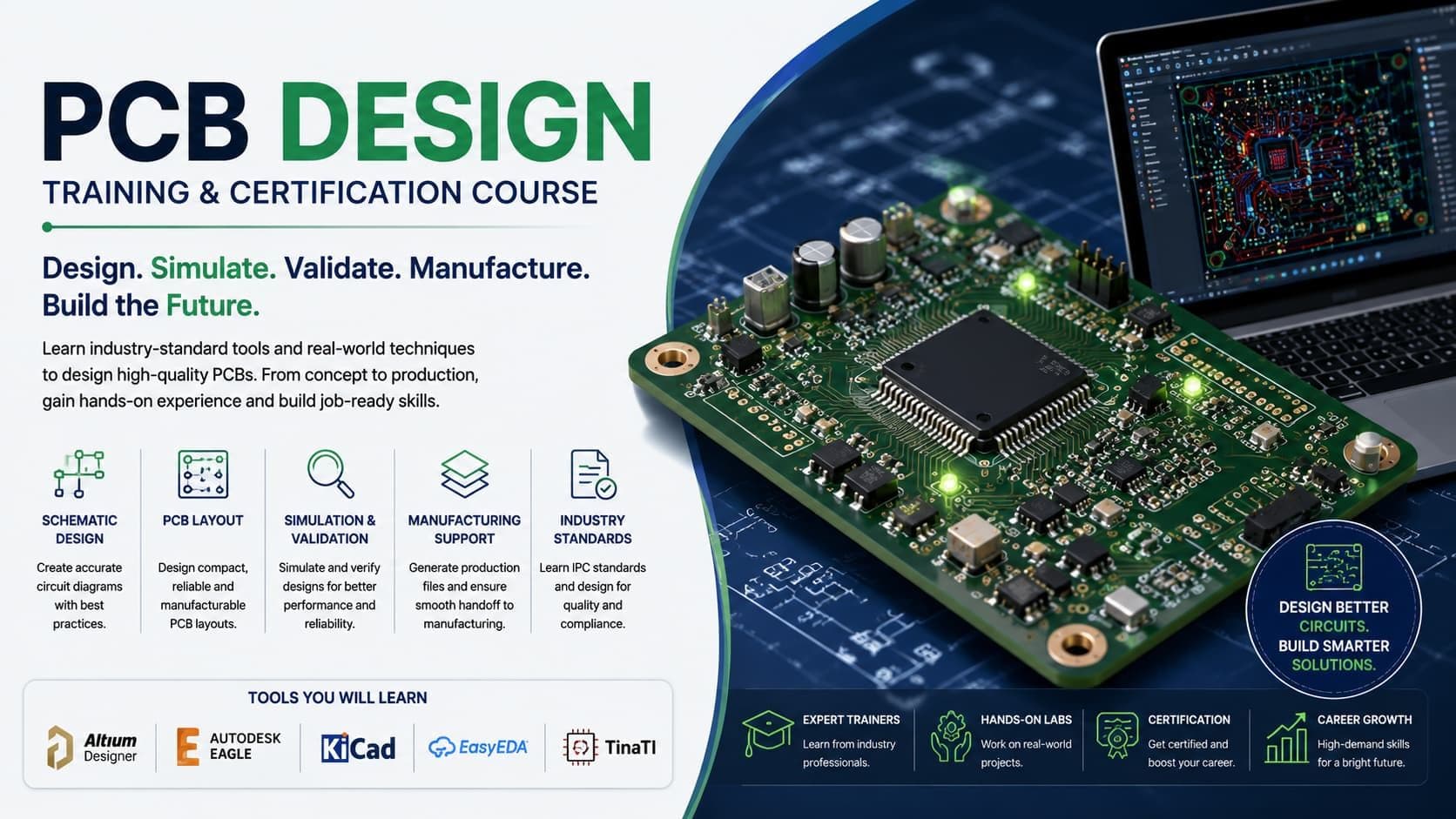
Popular Techniques Covered in This Course
1. Basic Electronics Knowledge
2. Schematic Capture
3. PCB Layout Design
4. Understanding of Design Rules & Constraints
5. Signal Integrity & Power Integrity Basics
Get Hands-on Knowledge about Real-Time Projects
Key Features
Edubrights offers PCB DESIGN Training in virtual mode with expert trainers. Here are the key features,
40 Hours Course Duration
100% Job Oriented Training
Industry Expert Faculties
Free Demo Class Available
Completed 500+ Batches
Certification Guidance
Curriculum
📘 Module 1: Introduction to PCB Design
- What is a PCB and how does it function in electronics?
- Types of PCBs: single-sided, double-sided, multi-layer
- Real-world applications (IoT, robotics, consumer electronics)
- An outline of how a PCB is designed: Diagram → Design → Production
📘 Module 2: Getting Started with KiCad
- Installing KiCad (Windows/Linux/macOS)
Overview of KiCad's suite:
- Eeschema (Schematic editor)
- Pcbnew (PCB layout editor)
- Footprint Editor
- Symbol Editor
- 3D Viewer
- Gerber Viewer
- Project setup and file structure
📘 Module 3: Schematic Design in KiCad
- Creating a new project
- Adding and connecting components in Eeschema
- Using and managing symbol libraries
- Creating custom symbols
- Net labels and power symbols
- Electrical Rule Check (ERC)
- Generating the netlist or directly linking to PCB layout
📘 Module 4: PCB Layout in KiCad
- Transferring schematic to layout (netlist import)
- Setting board outline and layers
- Placement of components: best practices
- Creating custom footprints
- Manual routing of traces (tracks)
- Via placement and types
- Using zones (ground and power planes)
- Design Rule Check (DRC)
📘 Module 5: Libraries and Component Management
- Symbol and footprint libraries: project-local vs worldwide
- Using KiCad’s built-in libraries
- Creating and editing custom libraries
- Mapping symbols to footprints
- Using CvPcb tool (Footprint Assignment)
📘 Module 6: Design Rules and Constraints in KiCad
- Setting up the DRC settings, including via diameters, trace width, and clearance
- Establishing design limitations for several layers
- Understanding fabrication limits and matching rules
- Net classes and electrical rules setup
📘 Module 7: Advanced Layout Techniques
- Multi-layer board setup
- Grounding strategies and return paths
- Power plane and decoupling capacitor placement
- Differential pair routing basics (e.g., USB, Ethernet)
- Shielding and EMI/EMC reduction techniques
- Thermal considerations (thermal vias, copper pour)
📘 Module 8: 3D Visualization and Mechanical Integration
- Using the 3D Viewer in KiCad
- Assigning and customizing 3D models to components
- Exporting STEP files for enclosure fitting (integration with CAD tools like Fusion 360 or FreeCAD)
📘 Module 9: Generating Manufacturing Files
- Generating Gerber files for fabrication
- Drill files (Excellon format)
- Generating BOM (Bill of Materials)
- Pick and Place file generation
- Panelization basics
- Using the KiCad Plot Tool
📘 Module 10: Fabrication and Assembly
- Choosing a PCB manufacturer (e.g., JLCPCB, PCBWay)
- Submitting Gerber files and specifications
- PCB assembly: manual soldering vs outsourced assembly
- Testing and validation of the assembled PCB
Receive Training From Our Skilled and Effective Trainers
Experience in the Industry Gain knowledge from experts with practical PCB Design project experience in a variety of sectors.
Backgrounds at the Top Prominent corporations such as hcl, tcs , accenture and cognizant employ trainers.
Clear & Effective Teaching Excellent communication and real-world examples simplify complex subjects.
Hands-On Learning Focus Students can apply their abilities in real-world situations with the use of case studies and real-time projects.
Up-to-Date Knowledge Trainers stay current with the latest tools, techniques and best practices.
Certified PCB Design Professional
Our certification validates your expertise in PCB Design. Gain practical skills to apply PCB Design confidently in real-world projects. Ideal for professionals and freshers looking to strengthen their PCB Design career profile.

Course FAQs
What is PCB Design used for?
PCB Design is used to help developers build, style, or ship software applications efficiently using modern tools and frameworks. It gives teams a standardized way to work instead of relying on scattered spreadsheets, manual scripts, or one-off processes. Most organizations invest in PCB Design specifically because it reduces errors and speeds up day-to-day operations.
What is the duration of PCB Design training?
PCB Design training typically runs from a few weeks up to a couple of months, depending on whether you choose a weekday, weekend, or fast-track batch. The exact duration also depends on how deep the course goes into advanced topics versus just the fundamentals. Most learners can expect a structured path with clear milestones rather than an open-ended timeline.
Who can enroll in PCB Design training?
Freshers, graduates, working professionals, and career switchers can all enroll in PCB Design training. Most programs don't require prior experience, though basic computer familiarity helps you move faster through the early modules. If you're coming from a related field, you'll likely find the transition easier since many core concepts carry over.
Is PCB Design training available online?
Yes, PCB Design training is available in online, classroom, and hybrid formats, so you can choose the mode that fits your schedule and learning style best. Online batches typically include live instructor sessions plus recordings, so you don't lose access if you miss a class. Classroom and hybrid options add in-person practice time for learners who prefer hands-on guidance.
What topics are covered in PCB Design training?
PCB Design training covers core concepts, key tools, hands-on practice, and practical, real-world exercises, building from fundamentals up to advanced application. The syllabus is usually structured in modules, so you build one skill on top of the previous one instead of jumping around. By the end, you should be comfortable handling the kind of tasks that come up in an actual job role.
Will I receive a certificate after completing PCB Design training?
Yes, learners receive a course-completion certificate after finishing PCB Design training, which can be added to your resume and LinkedIn profile. The certificate signals to employers that you've completed a structured program, not just watched a few videos. Some institutes also help you prepare for official vendor or industry certification exams on top of the completion certificate.
Does PCB Design training include placement assistance?
Many PCB Design training providers offer placement support such as resume reviews, mock interviews, and introductions to hiring partners. This support usually kicks in toward the end of the course, once you have enough hands-on skills to speak to in an interview. It's worth asking upfront exactly what placement support includes, since it varies a lot between institutes.
What career opportunities are available after PCB Design training?
Completing PCB Design training can open up roles across organizations that rely on PCB Design for their day-to-day operations, spanning IT services, product companies, and consulting firms. Depending on your background, you could move into an associate, specialist, or analyst-level role in this area. Demand tends to be steady because organizations that have already adopted PCB Design need people who can support and extend it.
How is structured PCB Design training different from free online resources?
Structured PCB Design training offers guided instruction, hands-on projects, doubt-clearing sessions, and mentor support — elements that are hard to replicate through scattered, free resources alone. Free tutorials are useful for a quick overview, but they rarely follow a coherent path from beginner to job-ready. A structured course also gives you feedback on your work, which self-study generally can't.
Do I need a technical background to learn PCB Design?
A technical background can help but usually isn't mandatory for PCB Design training. Beginner-friendly batches start from the basics, so motivated learners from non-technical backgrounds can also follow along. That said, being comfortable with computers and logical thinking will make the learning curve noticeably smoother.
How do I choose the right institute for PCB Design training?
When choosing a PCB Design training institute, look at trainer experience, how current the curriculum is, the amount of hands-on project work, batch sizes, and post-training support. It also helps to ask for a syllabus in advance and compare it against what you actually need for your target role. Smaller batch sizes generally mean more individual attention from the trainer.
Are weekend batches available for PCB Design training?
Yes, most PCB Design training providers run dedicated weekend batches alongside weekday and fast-track options for working professionals. Weekend batches usually run a bit longer in total duration since there's less class time per week. This makes it a practical option if you're currently employed and can't commit to weekday evenings.
Will I work on real-time projects during PCB Design training?
Reputable PCB Design training programs include real-time projects and case studies alongside theory, so you leave with practical, portfolio-ready experience. These projects are usually modeled on situations you'd actually encounter on the job, not simplified textbook examples. Having project work to talk about also makes a real difference in interviews.
What is the typical batch size for PCB Design training?
Most PCB Design training providers keep batch sizes small so trainers can give individual attention and adapt the pace of the course to the group's progress. Smaller groups also make it easier to get your specific questions answered rather than getting lost in a large virtual classroom. If batch size matters to you, it's worth asking directly before enrolling, since it isn't always advertised.
Who typically teaches PCB Design training?
PCB Design training is usually delivered by trainers with hands-on industry experience, so lessons reflect current tools and practices rather than purely academic material. Many trainers continue working in the field alongside teaching, which keeps the content grounded in what employers actually expect. It's reasonable to ask about a trainer's background before committing to a batch.
Is prior experience required for PCB Design training?
Depending on the specific program, some PCB Design training assumes basic familiarity with related concepts, while others are fully beginner-friendly. It's worth checking the prerequisites for your chosen batch before enrolling so you're not starting from behind. If you're unsure, most institutes are happy to advise on whether a course fits your current skill level.
Can I attend a demo class before enrolling in PCB Design training?
Many PCB Design training institutes offer a free demo or trial session, letting you evaluate the trainer's teaching style and course structure before committing. This is a good way to check whether the pace and depth of the class actually match what you're looking for. Use the demo to ask questions about the syllabus, project work, and placement support too.
How much does PCB Design training cost?
Fees for PCB Design training vary by institute, course depth, and format, so it's best to compare a few providers directly and check what's included, such as materials, projects, and placement support. Online batches are often priced lower than in-person classroom training, though the content covered can be just as thorough. Always confirm whether the quoted fee covers the full course or just a portion of it.
Is PCB Design training suitable for corporate or group training?
Yes, several PCB Design training providers offer customized corporate batches for teams, with schedules and content adjusted to match an organization's specific tools and workflows. Corporate training often includes tailored case studies drawn from the company's actual systems and processes. This makes it easier for teams to apply what they've learned immediately after the training ends.
What support is available after completing this training?
Beyond the course itself, many institutes offer post-training support such as doubt-clearing sessions, access to updated materials, and continued placement assistance. Some also give alumni access to updated course content as the tool or platform evolves, so your knowledge doesn't go stale. It's worth asking what post-course support looks like before you enroll, since it varies significantly between providers.
Is PCB Design in high demand for jobs right now?
Demand for PCB Design skills tends to track how widely the tool or platform is used across industries, and organizations that have already adopted it consistently need people who can support and extend it. That said, demand can vary by region, sector, and role level, so it's worth researching current job postings in your target location. Combining PCB Design with a related, complementary skill often makes candidates more competitive.
What is the salary range after PCB Design training?
Salary after PCB Design training depends heavily on your prior experience, the city you're working in, and the specific role you land, so it's hard to quote a single figure that applies to everyone. Entry-level roles typically pay less than mid-level or specialist positions that require deeper PCB Design expertise. Checking current job listings on platforms like Naukri or LinkedIn for your target city gives a more accurate, up-to-date picture than any general estimate.
What are common PCB Design interview questions I should prepare for?
Interviews for PCB Design roles typically mix conceptual questions (explaining core terminology and workflows) with practical, scenario-based questions about how you'd handle a specific task or problem. Employers often also ask about any real projects you've worked on, so being able to walk through your training projects in detail matters. A good training program will usually include interview preparation as part of the placement support.
Is PCB Design certification worth it for my career?
A PCB Design certification is generally worth pursuing if the role you're targeting explicitly lists it as a requirement or preferred qualification, since it signals verified, structured knowledge to employers. Even where it's not mandatory, it can help your resume stand out among candidates with similar experience levels. That said, practical project experience alongside the certification tends to matter just as much as the certificate itself.
Can I learn PCB Design without a technical degree?
Yes, many learners without a technical degree successfully complete PCB Design training, especially when the course is structured to start from fundamentals. What matters more than your degree is your willingness to practice hands-on and work through the material consistently. Some roles may have specific requirements depending on the employer, so it's worth checking job descriptions for your target roles.
How does PCB Design compare to other similar tools in the market?
Every tool in this space has its own strengths, typical use cases, and ecosystem, so the right choice usually depends on what a specific employer or project already uses. PCB Design has its own particular strengths that make it a good fit for certain organizations and use cases, which is part of why demand for it persists even alongside competing tools. If you're deciding between multiple tools to learn, it often makes sense to check which ones are most commonly requested in job postings for your target region.
What software or tools do I need before starting PCB Design training?
Most PCB Design training programs will tell you the exact setup requirements before your batch starts, but a working laptop with a stable internet connection is the baseline requirement for online training. Some courses provide access to cloud-based lab environments so you don't need to install everything locally. It's worth asking the institute directly about system requirements before your first class.
Can I get a copy of the PCB Design course syllabus before enrolling?
Yes, reputable PCB Design training institutes will share a detailed syllabus before you enroll, so you can see exactly what's covered module by module. This is worth reviewing carefully and comparing against your specific learning goals or job requirements. If an institute is reluctant to share a syllabus upfront, that's generally a signal to ask more questions before committing.
Do you offer PCB Design training in both Chennai and Bangalore?
Yes, PCB Design training is available for learners based in both Chennai and Bangalore, along with online batches for those in other locations. Online training gives you access to the same curriculum and instructor-led sessions regardless of which city you're in. It's worth checking whether classroom or hybrid options are specifically available in your city if that's your preference.
What's the best way to prepare for a PCB Design job role after training?
Beyond finishing the course, building a small portfolio of real projects you can walk through in interviews makes a significant difference. Practicing mock interviews and reviewing common PCB Design interview questions ahead of time also helps you feel more confident. Staying active in relevant online communities or forums can help you keep up with how the tool or platform is evolving in real deployments.
Get Training Quote for Free
Testimonials
Hear What Our Students Say
"Transform your life through Education, hear it from our Alumni"

6 LPA
Fathima
Student
Software Engineer