How to Use Python with Control-M: A Practical Guide for Data Engineers
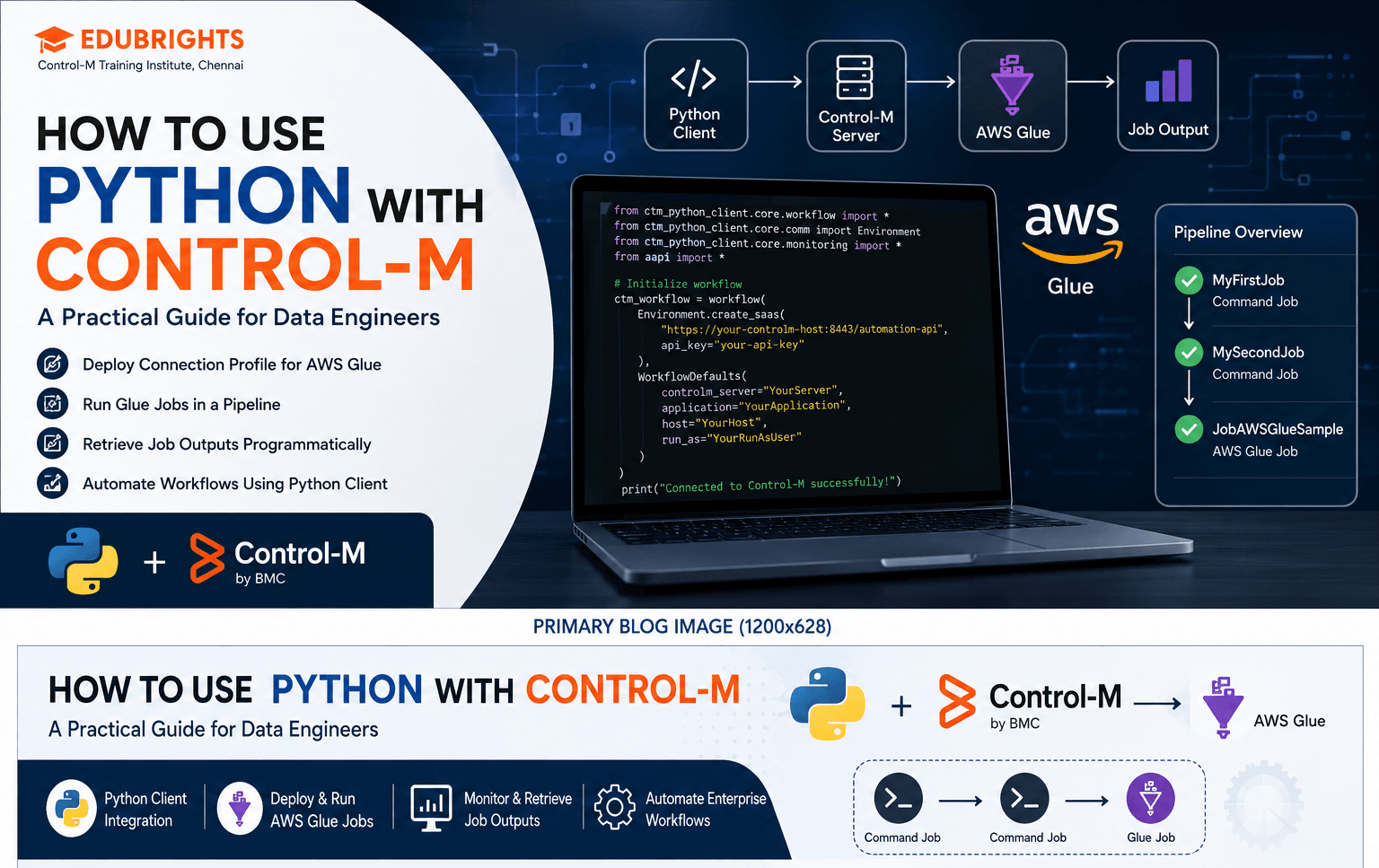
Learn how to use the Control-M Python client to deploy connection profiles, run AWS Glue jobs, and retrieve job outputs programmatically. A step-by-step guide for data engineers looking to automate workflows with Control-M's Automation API.
Why Use Python with Control-M?
Published by EduBrights | Control-M Training Institute, Chennai
If you've been working with Control-M for a while, you already know how powerful it is for orchestrating complex workflows. But here's what many engineers don't realize: Control-M has a dedicated Python client that lets you design, deploy, and monitor workflows entirely through code.
No clicking through GUIs. No manual deployments. Just clean, version-controlled Python.
In this guide, we'll walk you through how to get the Control-M Python client up and running, deploy a connection profile for AWS Glue, run Glue jobs as part of a pipeline, and retrieve job outputs — all programmatically.
Why Python + Control-M?
Python has become the default language for data engineering. Most modern data pipelines — whether they use Spark, Glue, dbt, or Airflow — are built and managed in Python. The Control-M Python client bridges that world with Control-M's enterprise-grade scheduling and monitoring capabilities.
What this means in practice:
- Data engineers can define and deploy workflows without needing separate DevOps support
- Workflows can be version-controlled in Git just like any other codebase
- CI/CD pipelines can trigger Control-M job deployments automatically
- Teams get a unified platform for visibility, SLA management, and orchestration
For this guide, we'll use AWS Glue — Amazon's serverless ETL service — as our integration example. The same principles apply to other integrations like Databricks, Azure Data Factory, or custom applications.
Prerequisites
Before you start, make sure you have:
- Python 3.7 or higher installed
- Access to a running Control-M environment (or Control-M Workbench for local testing)
- An AWS account with Glue configured (for the AWS-specific sections)
- A Python IDE like VS Code or PyCharm
Step 1: Set Up Your Python Environment
It's good practice to work in a virtual environment so your dependencies stay isolated.
On Linux/macOS:
python -m venv venv
source venv/bin/activate
On Windows:
python -m venv venv
venv\Scripts\activate.bat
Once your virtual environment is active, install the Control-M Python client:
pip install ctm-python-client
That's it for setup. Now let's connect to Control-M.
Step 2: Initialize the Workflow and Connect to Control-M
Every interaction with Control-M through Python starts with creating a Workflow object. This is where you define your Control-M server connection and set default parameters for the jobs you'll be deploying.
from ctm_python_client.core.workflow import *
from ctm_python_client.core.comm import Environment
from ctm_python_client.core.monitoring import *
from aapi import *

# Initialize the workflow with your Control-M environment details
ctm_workflow = Workflow(
    Environment.create_saas(
        "https://<your-controlm-host>:<port>/automation-api",
        api_key="<your-api-key>"
    ),
    WorkflowDefaults(
        controlm_server="<your-server-name>",
        application="<your-application>",
        host="<your-host>",
        run_as="<your-run-as-user>"
    )
)
Replace the placeholder values with your actual Control-M server details. If you're using Control-M Workbench locally, your host will typically be localhost.
Step 3: Deploy a Connection Profile for AWS Glue
A connection profile is where Control-M securely stores the credentials and configuration it needs to connect to an external service — in this case, AWS Glue.
Think of it like saving a database connection in a connection manager. Once deployed, Control-M holds this securely and reuses it across any job that needs it.
# Define the AWS Glue connection profile
cp = ConnectionProfileAwsGlue(
    '<your-connection-profile-name>',
    centralized=True,
    aws_region="<aws-region>",              # e.g., "ap-south-1" for Mumbai
    authentication="AccessKey",
    aws_access_key_id="<your-access-key-id>",
    aws_secret="<your-secret-access-key>",
    glue_url="<your-glue-endpoint-url>",
    connection_timeout="30"
)

# Add the connection profile to the workflow and deploy
ctm_workflow.add(cp)
cp_results = ctm_workflow.deploy(cp)

# Verify the deployment succeeded
if cp_results.is_ok():
    print("Connection profile deployed successfully!")
else:
    print("Deployment failed:", cp_results.errors)
Once deployed, this connection profile is available to any job in Control-M that needs to interact with your AWS Glue environment.
Step 4: Deploy Your AWS Glue Job
Now we can define the actual jobs. In this example, we'll create a small pipeline:
- MyFirstJob — a simple OS command job (used as a pre-check or trigger)
- MySecondJob — another OS job (simulating a dependency)
- JobAWSGlueSample — the actual AWS Glue ETL job
This pattern mirrors real-world pipelines where you might validate inputs or check for file availability before triggering a heavy ETL process.
# Define two simple prerequisite jobs
firstjob = JobCommand(
    'MyFirstJob',
    command='echo "Pre-check complete. Starting pipeline..."',
    host="<your-agent-host>",
    run_as="<your-agent-user>"
)

secondjob = JobCommand(
    'MySecondJob',
    command='echo "Dependencies verified. Triggering Glue job..."',
    host="<your-agent-host>",
    run_as="<your-agent-user>"
)

# Define the AWS Glue job
my_glue_job = JobAwsGlue(
    'JobAWSGlueSample',
    connection_profile="<your-connection-profile-name>",
    glue_job_name="<your-glue-job-name>"
)

# Group the jobs into a folder and set dependencies
my_folder = Folder(
    'MyDataPipelineFolder',
    ctm_server="<your-server-name>",
    jobs=[firstjob, secondjob, my_glue_job]
)

# Add folder to workflow and deploy
ctm_workflow.add(my_folder)
deploy_results = ctm_workflow.deploy()

if deploy_results.is_ok():
    print("Pipeline deployed to Control-M!")
Your pipeline is now live in Control-M. The three jobs will run in sequence, with the Glue job only triggering after the first two complete successfully.
Step 5: Run the Workflow and Retrieve Job Outputs
After deployment, you can run the workflow and fetch outputs for each job directly from Python — useful for automated testing, CI/CD pipelines, or just debugging.
# Run the deployed workflow
run = ctm_workflow.run()

# Wait for completion and print outputs for each job
run.print_output('MyDataPipelineFolder/MyFirstJob')
run.print_output('MyDataPipelineFolder/MySecondJob')
run.print_output('MyDataPipelineFolder/JobAWSGlueSample')
This gives you the same information you'd see in the "Output" tab of the Control-M GUI — logs, return codes, and any messages the job produced — all piped directly into your terminal or CI/CD log.
Checking Job Status in the Control-M GUI
If you prefer a visual overview, you can also monitor jobs through the Control-M Monitoring domain:
- Log in to the Control-M GUI
- Go to Monitoring and create a new viewpoint
- Filter by folder name, application, or job name to find your pipeline
- Click any job → select Output to view its logs
Both methods give you the same data — pick whichever fits your workflow.
Real-World Use Cases for the Control-M Python Client
Here's where this combination really shines in enterprise environments:
| Use Case | How Python + Control-M Helps |
|---|---|
| Nightly ETL pipelines | Schedule Glue jobs after upstream data validation passes |
| CI/CD integration | Trigger workflow deployments from Jenkins or GitHub Actions |
| Dynamic job generation | Generate and deploy job definitions based on database configs |
| SLA monitoring | Poll job status and send alerts if SLA thresholds are breached |
| Multi-cloud orchestration | Combine AWS Glue, Azure Data Factory, and on-premise jobs in one workflow |
Wrapping Up
The Control-M Python client removes the barrier between data engineering code and enterprise workflow orchestration. Instead of managing jobs through a GUI and code through a separate IDE, you can define, deploy, and monitor everything from one Python script.
If you're working in a banking, insurance, retail, or any data-intensive environment, this skill alone can significantly elevate your profile — both in terms of what you can deliver and what you can earn.
Start Building Enterprise Automation Skills
If you're looking to move beyond routine job scheduling and build expertise in enterprise workload automation, our Control-M Training helps you gain practical experience through instructor-led sessions, real-world projects, and hands-on cloud labs.
Enroll in the Next Batch for Control M Developer →Enroll in the Next Batch for Control M Admin →
Want to Learn This Hands-On?
At EduBrights, our Advanced Control-M Training program covers the Automation API, Python client integration, Control-M Helix, MFT, and more — with live lab access on a real Control-M environment.
📍 EduBrights Technologies Jamia Masjid, 1st Floor, P.H. Road, Shenoy Nagar, Aminjikarai, Chennai – 600030
📞 +91 94980 46428 📧 info@edubrights.in 🌐 edubrights.in
Drop us a WhatsApp or fill the enquiry form on our website to know about upcoming batches.
Tags: Control-M, Python, AWS Glue, Workload Automation, ETL, Control-M Training Chennai, Control-M Python Client, BMC Control-M
Get Training Quote for Free
Related Blogs
Master Your Future with the Best.NET Courses: A Complete Guide by Edubrights
In today’s rapidly evolving technology landscape, choosing the right skill can significantly shape your career path. This blog provides a complete guide to mastering .NET courses, one of the most in-demand technologies backed by Microsoft. It covers everything from understanding the fundamentals of .NET training to exploring advanced topics like ASP.NET, C#, cloud integration, and database management. The blog also highlights the benefits of enrolling in a .NET developer course, including career opportunities, certification value, and industry demand. Additionally, it explains why Edubrights stands out as a trusted training provider with expert trainers, hands-on projects, and career support. Whether you are a beginner or a professional, this guide helps you choose the right .NET certification course and build a successful future in software development.
Why PHP Courses Are Still the Smartest Choice for Aspiring Developers in 2026
This blog provides a complete introduction to PHP courses and their importance in today’s web development industry. It explains why PHP remains a relevant and in-demand programming language in 2026, what learners can expect from a structured PHP course, and the advantages of online PHP training. The article also highlights career opportunities, essential skills, and tips to succeed as a PHP developer. With a focus on practical learning and industry-relevant training, Edubrights helps students gain real-world experience and build a strong foundation in web development. Whether you are a beginner or a professional, this guide will help you choose the right PHP course and start your journey in the tech field.
Master Your Future with the Best.NET Courses: A Complete Guide by Edubrights
This blog provides a complete guide to choosing the right .NET course and building a successful career in software development. It explains what .NET courses are, what you will learn, and the benefits of enrolling in a .NET certification course. The article also highlights career opportunities, industry demand, and the importance of structured .NET training. With insights into Edubrights’ expert-led programs, learners can understand how to gain practical skills, work on real-time projects, and become job-ready. Whether you are a beginner or a working professional, this guide helps you take the right step toward becoming a successful .NET developer.

Looking for the Flask Course in Chennai? Here’s Why Edubrights is Your Top Choice!
This blog provides a complete guide for learners who are searching for the best Flask course in Chennai. It explains what Flask is, why it is an essential Python framework for web development, and how it helps build scalable web applications. The article highlights the growing demand for Flask developers in Chennai’s IT industry and the importance of choosing the right training institute. It also covers the key features of Flask courses, including hands-on projects, real-time training, and career opportunities after completing a Flask training course in Chennai. Additionally, the blog showcases why Edubrights stands out as a top choice by offering industry-oriented curriculum, expert trainers, flexible learning options, and placement support. Overall, this blog is designed to help beginners, students, and professionals make an informed decision about enrolling in Flask courses and building a successful career in web development.