Skill Up Today With Knowledge and Build a Brighter Tomorrow for Yourself - Flat 20% Off Course Fee Enroll Now!
Popular

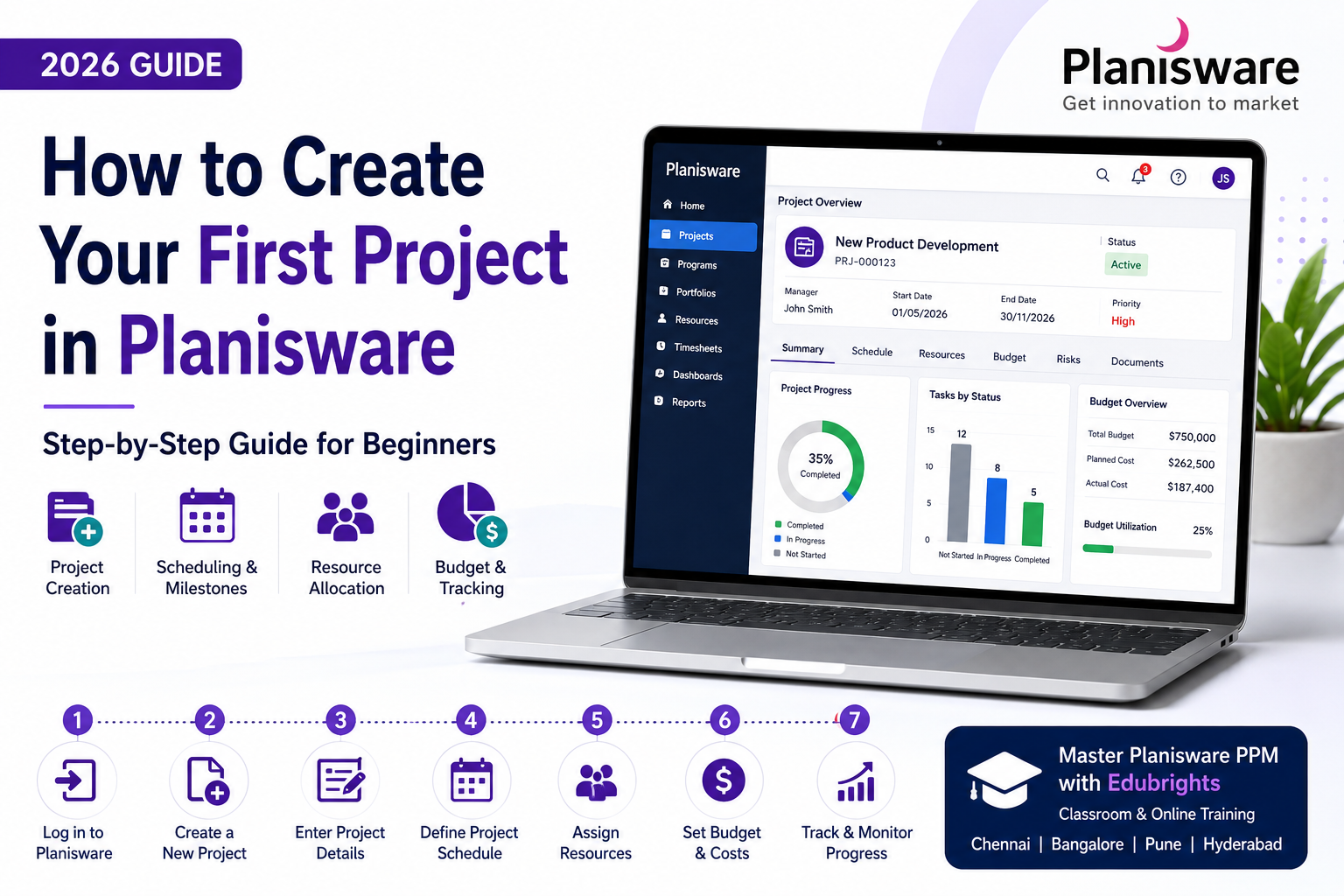
How to Create Your First Project in Planisware: Step-by-Step Guide (2026)

Mohamed Akram
July 2, 2026
10 min read

Learn how to create your first project in Planisware with this beginner-friendly guide. Understand project setup, planning, scheduling, resource allocation, and best practices to manage projects efficiently using Planisware.

![How to Create Your First Project in Planisware] (https://res.cloudinary.com/drhkeytvk/image/upload/v1783080442/how-to-create-your-first-project-in-planisware_k9peyb.png)

Introduction

Managing projects efficiently is essential for every organization. As businesses handle multiple projects, resources, and budgets simultaneously, they need a reliable Project Portfolio Management (PPM) solution. Planisware is one of the leading PPM platforms that helps organizations plan, execute, and monitor projects effectively.

If you're new to Planisware, creating your first project may seem challenging. However, once you understand the basic workflow, it becomes a simple and structured process.

In this beginner-friendly guide, you'll learn how to create your first project in Planisware, from setting up project details to assigning resources and tracking progress.


What is a Project in Planisware?

A project in Planisware is a structured workspace where you manage tasks, schedules, resources, budgets, risks, and project milestones.

Each project contains essential information such as:

  • Project name
  • Timeline
  • Budget
  • Team members
  • Tasks and milestones
  • Resource allocation
  • Progress reports

Planisware centralizes this information, making it easier for project managers and stakeholders to collaborate effectively.


Prerequisites Before Creating a Project

Before creating your first project, ensure you have:

  • Access to the Planisware application
  • Required user permissions
  • Basic understanding of project objectives
  • Resource and team information
  • Estimated project timeline and budget

Having this information ready helps you set up the project efficiently.


Step 1: Log in to Planisware

Start by logging into your Planisware account using your organization's credentials.

After logging in, navigate to the Project Portfolio or Projects section from the dashboard. Depending on your organization's configuration, the menu names may vary slightly.


Step 2: Create a New Project

Click the Create Project or New Project option.

You may be asked to choose a project template. Templates help standardize project creation by including predefined workflows, milestones, and approval processes.

If no template is available, you can start with a blank project.


Step 3: Enter Project Details

Fill in the basic project information, including:

  • Project Name
  • Project Description
  • Project Manager
  • Start Date
  • End Date
  • Business Unit
  • Priority Level
  • Project Category

Providing accurate project details helps improve reporting and portfolio management later.


Step 4: Define the Project Schedule

The next step is creating the project schedule.

Add:

  • Project phases
  • Tasks
  • Milestones
  • Dependencies
  • Estimated durations

A well-planned schedule allows teams to monitor progress and identify delays early.


Step 5: Assign Resources

Resource management is one of Planisware's strongest features.

Assign employees based on:

  • Skills
  • Availability
  • Department
  • Workload
  • Project role

Balanced resource allocation helps prevent overloading team members and improves project delivery.


Step 6: Set Budget and Costs

Enter your estimated project budget.

You can define:

  • Labor costs
  • Material costs
  • External vendor costs
  • Planned expenses
  • Forecasted budget

Tracking financial information helps organizations control spending throughout the project lifecycle.


Step 7: Save and Monitor the Project

Once all project information has been entered, save the project.

Planisware provides dashboards and reports that help you monitor:

  • Project progress
  • Budget utilization
  • Resource availability
  • Task completion
  • Risks and issues
  • Portfolio performance

Regular updates ensure stakeholders always have accurate project information.


Best Practices

To get the most out of Planisware:

  • Define clear project objectives.
  • Keep project schedules updated.
  • Allocate resources realistically.
  • Monitor budgets regularly.
  • Review project dashboards frequently.
  • Update milestones on time.
  • Communicate changes with stakeholders.

Following these practices helps improve project success rates.


Common Mistakes to Avoid

Many beginners make avoidable mistakes, such as:

  • Creating incomplete project details
  • Ignoring resource availability
  • Setting unrealistic deadlines
  • Not updating project progress
  • Skipping budget tracking
  • Failing to review reports regularly

Avoiding these issues makes project management more effective.


Career Opportunities

As organizations adopt enterprise Project Portfolio Management solutions, professionals with Planisware skills are increasingly in demand.

Popular roles include:

  • Planisware Consultant
  • PMO Analyst
  • Project Manager
  • Portfolio Manager
  • Resource Manager
  • Business Analyst
  • Project Planner

Companies across Chennai, Bangalore, Pune, and Hyderabad continue to hire professionals with practical Planisware experience.


Learn Planisware with Edubrights

If you're looking to build a career in Project Portfolio Management, Edubrights offers industry-focused Planisware Project Portfolio Management Training with:

  • Live Instructor-Led Sessions
  • Hands-on Practical Exercises
  • Real-Time Industry Scenarios
  • Resume Building
  • Mock Interviews
  • Placement Assistance

👉 Explore our Planisware Course:
https://edubrights.in/courses/planisware-project-portfolio-management-course-in-chennai


Frequently Asked Questions

Is Planisware easy for beginners?

Yes. With structured training and regular practice, beginners can quickly learn how to create and manage projects in Planisware.

Do I need coding knowledge?

No. Planisware mainly focuses on project management, resource planning, budgeting, and portfolio management.

Can I use templates while creating projects?

Yes. Many organizations use project templates to standardize project creation and improve consistency.


Conclusion

Creating your first project in Planisware is straightforward when you follow a structured approach. By defining project details, building schedules, assigning resources, and tracking progress, you can efficiently manage projects from initiation to completion.

As more organizations invest in enterprise Project Portfolio Management, learning Planisware can significantly improve your career prospects. Whether you're a beginner or an experienced professional, mastering Planisware will help you manage projects more effectively and become a valuable asset to any organization.

A step-by-step guide to creating your first project in Planisware
covering project setup
planning
scheduling
resources
and best practices for beginners.

Get Training Quote for Free

Related Blogs

An Insider Guide to Web Application Security Careers

An Insider Guide to Web Application Security Careers

Explore web application security courses to secure web apps against cyber threats.

Akaram
8 min read
How Can You Get Ready for a Data Science Interview After Finishing a Course?

How Can You Get Ready for a Data Science Interview After Finishing a Course?

Preparing for a data science interview is an important step after completing a data science course. While training helps you learn key concepts, interviews require you to demonstrate practical knowledge, problem-solving ability, and clear communication. This blog explains how reviewing core data science concepts, practicing real-world projects, strengthening programming skills, and preparing common interview questions can help candidates succeed. It also highlights the importance of building a strong portfolio, improving communication skills, and staying updated with industry trends to increase your chances of starting a successful career in data science.

Mohamed
8 min read
What You Will Learn in a Professional MySQL Course – Curriculum Explained

What You Will Learn in a Professional MySQL Course – Curriculum Explained

In today’s data-driven world, databases play a critical role in almost every application, from small websites to large enterprise systems. Among all database technologies, MySQL continues to be one of the most widely used and trusted solutions across industries. If you are planning to build a career in database management, web development, or data-related roles, enrolling in professional mysql courses can be a smart and future-proof decision. This blog explains in detail what you will learn in a professional MySQL course, how the curriculum is structured, and why choosing the best mysql course can make a real difference in your career growth.

Top Interview Questions for Java Backend Developers

Top Interview Questions for Java Backend Developers

This blog covers top Java backend interview questions with clear answers, focusing on Spring Boot, REST APIs, Hibernate, security, and performance to help freshers and professionals prepare confidently.

Akaram
8 min read